Thursday, 29 January 2015

Voice Dream Writer: Word Processing Plus a Whole Lot More


Voice Dream has become a well-known name in the assistive technology community because of Voice Dream Reader: a text-to-speech reader available for iOS devices. Now the developer has released a new app called Voice Dream Writer which aims to support writers with special needs. Voice Dream Writer has features that can benefit people with a wide range of needs including people with dyslexia and people who are blind or visually impaired. People without disabilities can also benefit from the app. For example, english language learners could benefit from spoken feedback and other features offered by Voice Dream Writer. 

The text-to-speech feedback is designed to help writers find mistakes in their writing. The style of text-to-speech reading can even be changed to help writers focus either on spelling and grammar, or on content and organization. The app also offers easy access to an outline view that can help with organizing a document. Other features allow users to look up words phonetically or look up words by its meaning. 

The text-to-speech feedback can be accessed as users type so they can verify that a word or sentence was entered as they intended. This helps writers identify words or phrases that looked correct, but upon hearing them read aloud sound incorrect. The app will also read back text that has been dictated to help users insure that their voice was transcribed correctly.

When it is time to review a document, Voice Dream Writer includes some very thoughtful features for editing. The app includes two customizable proof reading modes that use text-to-speech to help with the editing process. The first is designed to help writers edit the content of their document. In this mode words are read back using text-to-speech sound natural and smooth: as they would when reading a book with Voice Dream Reader. This allows writers to focus on the content and organization of their document. 

The second mode reads text back in a somewhat choppy manner which allows users to focus their document at the micro level. This mode is ideal for editing spelling a grammar because the lack of flow with the text-to-speech voice makes it easier to focus on each word rather than the overall content of the text.

Each proofreading mode is customizable with options to announce misspelled words, spell homophones, and speak punctuation and capitalization.

Similar to Voice Dream Reader, Voice Dream Writer includes the ability to change the visual style of the app. Font size, character and line spacing, margins, text color, and background color can all be changed. Additionally, users can change the text to speech voice and speaking rate to match their preferences. Text-to-speech voices purchased in Voice Dream Reader are available in the Writer without an additional purchase. The pronunciation dictionary also syncs between the Writer and the Reader if both are installed on the same device.

Text files can be imported from iCloud Drive or supported third party services such as Google Drive or Dropbox. Unfortunately, users can only import text files and not Microsoft Word files. Documents can be exported as HTML, RTF, Microsoft Word, or Apple Pages format.

Click read more below to continue to read the review of Voice Dream Writer. Some of the most innovative and helpful features will be described below.

Some of Voice Dream Writers most helpful features can be found in the right sidebar menu. First is a dictionary which can read back the definitions of a word (This feature is currently not available in Voice Dream Reader without using VoiceOver). The second tool allows users to enter a word spelled phonetically to find the correctly spelled option.  For example, if I typed "receat," it   might suggest the word "receipt," as an option. Unlike some other apps, these suggestions are not made based on the context of the surrounding text. Users can tap on each suggestion to hear the word spoken aloud. This feature is extremely helpful for poor spellers, especially when they are in a situation where using dictation would be inappropriate or unavailable. 

The last feature on the right sidebar is the option to look up a word by meaning. For example, if I was writing about organizations which donate money to charities, but could not think of the word "philanthropic" I could search "donate money" and "philanthropic" would be one of the suggestions. This can help reduce instances of a word being at the tip of your tong, but you can quite think of the word.

In the left sidebar menu is an outline view. Users can select to view an outline of their document by heading, paragraph, or sentence. Users can then simply rearrange paragraphs or headings by dragging and dropping. This is helpful for the planning stages of writing as users can plan different paragraphs and fill in the content after they are finished planning.

All formatting in Voice Dream Writer is done using markdown. This means that all editing is done in plain text, but symbols inserted before or after words cause the words to be formatted when the file is exported. For example, adding a # or * before a word will cause that word to be formatted as a heading or as italic font when exported. This system has some positives and some negatives over conventional formatting that is found in Microsoft Word and Apple's Pages. 

For blind users this system can be helpful because the special characters such as # and * will be spoken allowing them to quickly recognize when a portion of text is bold or italics. In other word processors italics and bold text may be read normally making it more difficult for blind users to determine how the document is formatted. However, for sighted users this system may be unfamiliar and therefore more difficult. It would be nice if Voice Dream Writer had both the option of using markdown and for editing in rich text and allowed the users to decide which option worked best for their needs.

Finally, Voice Dream Writer includes a new innovation which improves the text selection and cursor movement process for VoiceOver users. These tasks are normally difficult for VoiceOver users. VoiceOver is a built in screen reader available on iOS devices that allows blind and visually impaired users to use gestures in order to use their device. When VoiceOver is enabled, Voice Dream Writer automatically adds three buttons to the bottom left of the screen. The first button controls the cursor and accepts a combination of multi-figure taps and swipes to move the cursor forward and backwards through the document. The second button adjusts how much the cursor moves with each swipe of the first button. This button allows the cursor to move letter-by-letter, word-by-word, sentence-by-sentence or paragraph-by-paragraph. The third button allows users to easily select text and then copy or cut that text. This system of selecting text and moving the cursor with VoiceOver is much faster than the method used in other apps and is a major benefit of Voice Dream Writer for VoiceOver users.

Voice Dream Writer is available for all iOS devices running iOS 8 and higher. While iPhone support is certainly convenient when writing a quick email, the iPad's large screen seems best suited for longer writing. Users who want to use the app for writing long pieces will probably wish to use a Bluetooth keyboard for faster typing. People using Bluetooth keyboards will also enjoy the ability to use keyboard shortcuts with the app. More keyboard shortcuts will be added in future versions as well. For example, in the future users with Bluetooth keyboards will be able to enter a key combination to quickly find all misspelled words.

In all Voice Dream Writer has many superb features that can help writers with a wide variety of needs. Hopefully rich text editing and the ability to import Word documents will be added in a future version. Voice Dream Writer seems like it would also make a great Mac app and hopefully someday people will be able to use these features on their Macs. Even without rich text editing and Mac support, Voice Dream Writer seems amazingly polished and well thought through for a version 1.0 app. To purchase Voice Dream Writer for $10 on the App Store click here. The app will be on sale for $8 until Sunday, February 1, 2015.

If you’re still unsure about the apps features watch the video below in which Winston Chen, the developer of Voice Dream Reader and Voice Dream Writer, walks viewers through his latest app.


Wednesday, 28 January 2015

The Most Accurate PDF Tables to Excel Converter

Working with PDF format is often the most desirable format to use in the office. When we send a report to someone we don�t have to worry about the format being disarranged or changed in the process of opening and viewing. When sharing data with others PDF format is preferred because it looks the same on Windows, Mac, iOS, Android or any other platform.

However, problems can occur when we encounter a report, statement, or a receipt in PDF format with data that we need to reuse for some other purpose. In such situations, we realize that extracting data is not easy. A simple copy and paste can take ages, and it doesn�t work for scanned documents. When we encounter such problems, we can use software which performs PDF to Excel conversions. By using this software, the data we want to extract gets converted to a spreadsheet from which we can easily copy it or continue editing.

There are multiple software programs which offer such functionality but they differ in quality and features offered. PDF tables can differ in distribution of rows and columns. For example, they can have different heights and widths and be nested into each other. In this case, the software might not recognize everything correctly, which is why we liked the custom Excel conversions feature offered by the popular, professional software, Able2Extract. The accuracy is outstanding. They basically offer the best possible row and column recognition technology. Here is a brief tutorial on how it works:

1) Selecting a PDF table

Able2Extract�s PDF Converter enables you to select the table you need to convert. For example, if you have a one thousand page document and the table you need is on page 500, you don�t need to convert all of the pages. You simply need to go to page 500 and select the table you wish to convert. However, if you do need to convert the entire document, it�s no problem. Large documents can quickly be converted into .xlsx format.

2) Choosing a Conversion option

The software offers two conversion options when converting to Excel spreadsheets.


The first one is automatic; you will probably use this one the most frequently. This is often enough because the conversion engine itself will recognize columns and row structure without you having to worry.

The other option, Custom allows users themselves to specify how the rows and columns should be represented in a new spreadsheet. Let�s say for example, that you want to merge two rows into one. It would be very hard to do that in the Excel spreadsheet itself, but you can specify it before the conversion and save yourself a lot of work.

The same goes for columns. Rows and columns are represented by red lines. If there are lines differentiating rows and columns that you don�t need, simply choose option Erase Row Line/Erase Column Line. If you need the opposite click on Add Columns / Add Rows.


3) Previewing the conversion output

Another significant feature which significantly saves time is the ability to monitor the changes in custom format in real time by choosing the show preview option. This is a very powerful option that leaves a lot of room for experimenting.

4) Mass adjust row and columns settings

PDF tables differ in how they are structured. If we have a document with hundreds of pages we can perform custom adjustments on all of them.

For adjusting Columns, first you should choose how the columns should be split. They can be split if there are two spaces between words, three spaces, and so on.


You can also adjust column types if they are number, text format or something else. This is also very important when working with Excel sheets.


For adjusting rows, you should choose one representative row which will be the prime example. All other rows should adjust to it, or alternatively you can choose to use document horizontal lines in adjusting rows.


All in all, Able2Extract PDF converter is indeed very powerful when it comes to adjusting rows and columns for specific pages. If you are a heavy Excel user that has to deal with PDF to Excel conversions daily, chances are that you will love this feature. It will save you a lot of time and work.

The Able2Extract team has a list of sample files converted from PDF to Excel format. You can use them to test this amazing feature. For testing you will need a trial version of this software, which you will definitely find useful.

Saturday, 24 January 2015

Five Books to Read for Better Content

Content Marketing is now the name of the game. With the rise of social media and short attentions spans, one must be able to easily and consistently produce shareable content. Be it for social media, for blog, or for website, here are some of the best books to read to help make your content better.

1. Jab, Jab, Jab, Right Hook (Gary Vaynerchuk)

Vaynerchuck is the CEO and Co-founder of Vaynermedia, a social media brand consulting agency. In this book, he talks about how to utilize the different social media platforms of today. He ran through Facebook, Twitter, Google+, Instagram, and other rising platforms such as Snapchat to discuss what type of content works best. He also gives examples companies with the best and worst utilization of each platform.

Read to: develop campaigns, raise brand awareness, and engage customers using different social media platforms.


2. Epic Content Marketing (Joe Pulizzi)

The title says it all: this book provides a roadmap in developing content that engages customers and makes people seek it out. Joe Pulizzi talks about leveraging on social media to propagate your content, how to write content that drives behavior, and measuring the impact of your content marketing efforts.

Read to: use content marketing to affect consumer behavior and measure it�s impact.

3. Talk Like Ted (Carmine Gallo)

With a tagline of �ideas worth spreading,� TED talks conferences are not only greatly attended but also quickly shared. With speakers tackling different topics and featuring some of the best and most innovative thinkers and doers of different industries, TED talks are enjoying an increasing level of popularity. While the primary focus of this book is public speaking, there are many gems in it that can be applied to content marketing. It talks about the best practices of the most popular TED presentations, specifically how to present an idea as simply as possible to get the point across as quickly and clearly as possible.

Read to: develop easily communicated content

4. Youtility: Why Smart Marketing is About Help Not Hype (Jay Baer)

If you browse around online, it�s easy to notice that a large percentage of shared content are those that people find useful. Think: 10 Easy Ways to Flat Abs and other stuff like that. This book talks about the idea behind that. It discusses how companies can identify customers� needs and shape their content to address those needs. It talks about how to meet the goal of being relevant and shareable based on today�s standards.

Read to: develop content that is hinged on customers� needs

5. Superfreakonomics (Steven Levitt and Stephen Dubner)

Levitt and Dubner are an Economist and a journalist, respectively, that teamed up and decided to use economics principles in explaining different things from how a street prostitute is like a department store Santa and whether or not people are predisposed to altruism or selfishness. This is not really a content marketing book but one can take a look at how the book was written. Levitt and Dubner were talking about statistics and mathematical regressions to explain how they were able to derive their conclusions in a way that laymen not only understand but also enjoy. It takes a lot of word skills to do that.

Read to: develop a voice that is credible, authoritative, yet relatable.

Just remember, if you want to make readers interested in what you write, your content should be amazing. And more tips to learn how to brighten your content can be found here. Hope that your content will get better with each day!


Author Bio:
Yohana Petrovic is a writer and blogger. She has 10 years` experience in educating and now she is a proofreader at globalessays.org . You can reach her on Facebook: Yohana Petrovic or on Twitter: @YohanaPetrovic

Five Books to Read for Better Content

Content Marketing is now the name of the game. With the rise of social media and short attentions spans, one must be able to easily and consistently produce shareable content. Be it for social media, for blog, or for website, here are some of the best books to read to help make your content better.

1. Jab, Jab, Jab, Right Hook (Gary Vaynerchuk)

Vaynerchuck is the CEO and Co-founder of Vaynermedia, a social media brand consulting agency. In this book, he talks about how to utilize the different social media platforms of today. He ran through Facebook, Twitter, Google+, Instagram, and other rising platforms such as Snapchat to discuss what type of content works best. He also gives examples companies with the best and worst utilization of each platform.

Read to: develop campaigns, raise brand awareness, and engage customers using different social media platforms.


2. Epic Content Marketing (Joe Pulizzi)

The title says it all: this book provides a roadmap in developing content that engages customers and makes people seek it out. Joe Pulizzi talks about leveraging on social media to propagate your content, how to write content that drives behavior, and measuring the impact of your content marketing efforts.

Read to: use content marketing to affect consumer behavior and measure it’s impact.

3. Talk Like Ted (Carmine Gallo)

With a tagline of “ideas worth spreading,” TED talks conferences are not only greatly attended but also quickly shared. With speakers tackling different topics and featuring some of the best and most innovative thinkers and doers of different industries, TED talks are enjoying an increasing level of popularity. While the primary focus of this book is public speaking, there are many gems in it that can be applied to content marketing. It talks about the best practices of the most popular TED presentations, specifically how to present an idea as simply as possible to get the point across as quickly and clearly as possible.

Read to: develop easily communicated content

4. Youtility: Why Smart Marketing is About Help Not Hype (Jay Baer)

If you browse around online, it’s easy to notice that a large percentage of shared content are those that people find useful. Think: 10 Easy Ways to Flat Abs and other stuff like that. This book talks about the idea behind that. It discusses how companies can identify customers’ needs and shape their content to address those needs. It talks about how to meet the goal of being relevant and shareable based on today’s standards.

Read to: develop content that is hinged on customers’ needs

5. Superfreakonomics (Steven Levitt and Stephen Dubner)

Levitt and Dubner are an Economist and a journalist, respectively, that teamed up and decided to use economics principles in explaining different things from how a street prostitute is like a department store Santa and whether or not people are predisposed to altruism or selfishness. This is not really a content marketing book but one can take a look at how the book was written. Levitt and Dubner were talking about statistics and mathematical regressions to explain how they were able to derive their conclusions in a way that laymen not only understand but also enjoy. It takes a lot of word skills to do that.

Read to: develop a voice that is credible, authoritative, yet relatable.

Just remember, if you want to make readers interested in what you write, your content should be amazing. And more tips to learn how to brighten your content can be found here. Hope that your content will get better with each day!


Author Bio:
Yohana Petrovic is a writer and blogger. She has 10 years` experience in educating and now she is a proofreader at globalessays.org . You can reach her on Facebook: Yohana Petrovic or on Twitter: @YohanaPetrovic

Monday, 12 January 2015

Six New Essential iPhone Apps Each Traveller Can't Live Without

If you are a traveler, you need to invest in some iPhone applications as they will help you in the long run. Think about it, if you are in the country or overseas, you can make your life easier with a few apps. While true, there are a lot of applications that are a waste of time, and you should try to find ones that offer you what you need. With this in mind, here are six new essential iPhone apps each traveler can't live without.

Weather Line: If you are like most people, you like to know what the weather will be like any given day. This is especially important if you want to get out of your hotel room and go out on your own. Since most travelers will walk a lot, it�s important to download the Weather Line app. Then, when you wake up in the morning, you can see the weather forecast for the day. Furthermore, if you are wise, you will use this app to get the forecast for later in the week and future cities you plan to visit. Either way, with the Weather Line app, you are not going to leave the hotel or hostel unprepared.

XE Currency App: When you travel abroad, you will want to know the currency exchange rate. By knowing the true value of your money and the local currency, you can�t get ripped off by people who take advantage of unknowing tourists. Since the exchange rate changes daily, and sometimes widely, this is a wise application to have on your phone. Yes, you can't trust the local money changers as many of them are out to make money off foolish tourists. On the other hand, if you check the local paper, you will get yesterday�s rate, and you won't know the true value of your money. So, before you head overseas, make sure to download the XE Currency App.

Yelp: While on the road, most people have no idea what lies ahead as far as restaurants and bars. Not only that, if you want to get a massage or check out a movie, you will have to rely on luck and lots of asking questions in the streets. To save time and find the best places to check out, make sure to install the Yelp application on your phone. Then, without a doubt, you can find the best places to go, and you will have an easier time enjoying the local experience.

Skype: If you want to make long-distance phone calls from out of your home country, you are going to waste a lot of money. Not only that, you will get a horrible connection many of the times. On the other hand, with Skype, you can chat with your buddies in real-time, all for free. Furthermore, you can message your friends or family member�s links of your photos and information. Then, you will enjoy your trip more as you can show off and keep in constant contact with the ones you love.

Dropbox: When you are out-of-town and on the road, you will want access to your stuff. Think about it, what if you want to access your passport photo or important files? With Dropbox, you can log in and see your stuff. This makes it easier should you run into any problems. In fact, if you work on the road, you should download Dropbox now and synch it to your iPhone. That way, when you are gone, you are not truly away from your computer and files.

WhatsApp: While not wildly popular in some countries, WhatsApp is a great texting app. Whether you are renting a place off Airbnb or trying to meet a local for a coffee, you will have an easier time with WhatsApp as you won�t pay any fees to text someone in another country, and the person on the other end will not pay a fee. All you must do is download the program and synch it with your current number. Then, when you want to text someone, add him or her to your contacts. Then, you can send images, video, audio or texts to your friends and family all over the world. Simply put, if you are going to travel internationally, you need to download and install WhatsApp.

With these six iPhone applications, you can save a lot of time and money while you are on vacation. In the end, it�s wise to consider these apps and a few more as you will go a long way in ensuring that you have a fun, safe and enjoyable adventure wherever you may go. Remember, while these are great apps and you can rely on them to make your tri more enjoyable, you need to think of your own unique wants and needs while on the road.


Author Bio:
This article was written by Natalya Pobedova. She is 28, from Czech Republic, and runs a flight help website called http://www.travelsiders.com/ as a hobby. At the moment, she works as a freelance web developer. When she has a free minute, she is hanging out with her friends or helping others at Stack Overflow.

Six New Essential iPhone Apps Each Traveller Can't Live Without

If you are a traveler, you need to invest in some iPhone applications as they will help you in the long run. Think about it, if you are in the country or overseas, you can make your life easier with a few apps. While true, there are a lot of applications that are a waste of time, and you should try to find ones that offer you what you need. With this in mind, here are six new essential iPhone apps each traveler can't live without.

Weather Line: If you are like most people, you like to know what the weather will be like any given day. This is especially important if you want to get out of your hotel room and go out on your own. Since most travelers will walk a lot, it’s important to download the Weather Line app. Then, when you wake up in the morning, you can see the weather forecast for the day. Furthermore, if you are wise, you will use this app to get the forecast for later in the week and future cities you plan to visit. Either way, with the Weather Line app, you are not going to leave the hotel or hostel unprepared.

XE Currency App: When you travel abroad, you will want to know the currency exchange rate. By knowing the true value of your money and the local currency, you can’t get ripped off by people who take advantage of unknowing tourists. Since the exchange rate changes daily, and sometimes widely, this is a wise application to have on your phone. Yes, you can't trust the local money changers as many of them are out to make money off foolish tourists. On the other hand, if you check the local paper, you will get yesterday’s rate, and you won't know the true value of your money. So, before you head overseas, make sure to download the XE Currency App.

Yelp: While on the road, most people have no idea what lies ahead as far as restaurants and bars. Not only that, if you want to get a massage or check out a movie, you will have to rely on luck and lots of asking questions in the streets. To save time and find the best places to check out, make sure to install the Yelp application on your phone. Then, without a doubt, you can find the best places to go, and you will have an easier time enjoying the local experience.

Skype: If you want to make long-distance phone calls from out of your home country, you are going to waste a lot of money. Not only that, you will get a horrible connection many of the times. On the other hand, with Skype, you can chat with your buddies in real-time, all for free. Furthermore, you can message your friends or family member’s links of your photos and information. Then, you will enjoy your trip more as you can show off and keep in constant contact with the ones you love.

Dropbox: When you are out-of-town and on the road, you will want access to your stuff. Think about it, what if you want to access your passport photo or important files? With Dropbox, you can log in and see your stuff. This makes it easier should you run into any problems. In fact, if you work on the road, you should download Dropbox now and synch it to your iPhone. That way, when you are gone, you are not truly away from your computer and files.

WhatsApp: While not wildly popular in some countries, WhatsApp is a great texting app. Whether you are renting a place off Airbnb or trying to meet a local for a coffee, you will have an easier time with WhatsApp as you won’t pay any fees to text someone in another country, and the person on the other end will not pay a fee. All you must do is download the program and synch it with your current number. Then, when you want to text someone, add him or her to your contacts. Then, you can send images, video, audio or texts to your friends and family all over the world. Simply put, if you are going to travel internationally, you need to download and install WhatsApp.

With these six iPhone applications, you can save a lot of time and money while you are on vacation. In the end, it’s wise to consider these apps and a few more as you will go a long way in ensuring that you have a fun, safe and enjoyable adventure wherever you may go. Remember, while these are great apps and you can rely on them to make your tri more enjoyable, you need to think of your own unique wants and needs while on the road.


Author Bio:
This article was written by Natalya Pobedova. She is 28, from Czech Republic, and runs a flight help website called http://www.travelsiders.com/ as a hobby. At the moment, she works as a freelance web developer. When she has a free minute, she is hanging out with her friends or helping others at Stack Overflow.

Friday, 9 January 2015

Keeble Keyboard for iPad: Flexible Text Input for Users with Special Needs


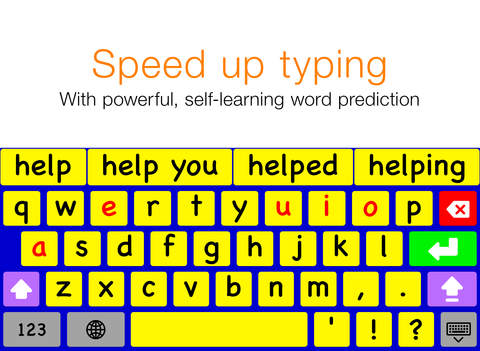
Keeble is a virtual keyboard for iPad made by AssistiveWare. The app is only available in English for iPads running iOS 8 and above. As a result of new features available in iOS 8 the Keeble keyboard can be used in almost every app on the iPad including mail, Safari, and messages. Keeble gives users a number of customization options to make text input easier for users with special needs such as motor challenges, dyslexia, and other disabilities.

One option available is the ability to change the appearance of the keyboard. Users can change the color of the keyboard which could be helpful for users with visual impairments. The higher contrast colors can be more easily seen compared to the white and gray colors of the default iOS keyboard. The layout can be change from a QWERTY layout to an ABC layout if desired.


Keeble also includes word predication to speed up typing; especially for Switch Control users. The word predication features is slightly more advanced than iOS 8's built-in word prediction. Keeble allows users to change the number of predictions offered above the three offered by the default iOS 8 keyboard.

Keeble also allows users to change how the keys respond to taps and presses. This is especially useful for users with motor challenges that may cause accidental taps or presses on unwanted keys. Hold duration can be set to change how long a key must be held before that character is entered. With this option enabled, quick accidental taps will not be registered. Additionally, the backspace repeat can be customized to avoid accidentally deleting text. A "select on release" option is also available which will enter text on release of a key instead when the key is pressed.

The last customization option allows users to turn on spoken feedback of the text they type. Feedback can be given letter by letter, word by word, and/or sentence by sentence. This feature allows people with dyslexia or poor spellers to confirm that what they words they think entered are the words that they hear being spoken back to them using text-to-speech. While this feature is useful it can only be enabled and disabled via the apps settings. If there was an option to turn on and off auditory feedback directly, it would be much easier to access the feature when needed and disable the feature when not needed. Users can totally turn off the iPad's speakers but this will also mute all other audio output. There is space on the bottom right of the number and symbol entry keyboard where quick access to this setting could be added.

The Keeble app costs $15 on the App Store. To download the app click here. Click read more below to view screenshots of the Keeble keyboard.


Tuesday, 6 January 2015

Now speak with Facebook and convert your speech into action - Thanks to Wit.ai

Ever thought of any tool that can convert your speech into action!! 

Till now people were talking about WhatsApp, which was acquired by Facebook. Now it's time of sending speech data which will convert into action. Great news!!

Now its time to welcome the new thoughts that can convert un-imaginary work into real ones. Facebook, the biggest Social Media Network, has once again spread its wings to join hands with the upcoming technology , called Wit.ai,  

People must be wondering about the name itself. Let me tell you in brief some basic points about Wit.ai. 

Wit.ai is a platform that turns human speech into an action. Like , for example, if you say "Turn the lights on at 7 pm", then it learns what users say and extracts the useful information and converts this into an action. Be it any command, it gives the necessary output in action. 

Very impressive. Right? 


Now coming to the point, Wit.ai has joined hands with Facebook, as it has the talent and resources to help the new company to take a new step. As Facebook has millions of users, the technology that understands its users' needs via speech is a big step. 

Wit.ai, is just 18 months fresh one to start and exists as "an open, distributed, community based platform that makes it easy for developers to build apps that users can talk to," as per the team that runs the operation.