Monday, 30 June 2014

5 Reasons Why You Should Convert Your HTML Site to WordPress

5 Reasons Why You Should Convert Your HTML Site to WordPress

Having an online presence for your brand has its share of incentives. And if you are already running an HTML website, you have already made your first move.

However, the decision to stick with HTML is something that won't pitch you well enough for gaining the leverage you have been striving for through your presence on the Internet. HTML binds you in may respects and thus, the experienced webmasters as well as the novices are beginning to lean towards converting their HTML sites into more customizable and dynamic websites. And this is where Content Management Systems come into the fray.

As and when an individual decides to have a website of his own, choosing the most ideal content management system is consideration that takes precedence over everything else. And when it comes to that, you are greeted with a whole ensemble of options. But, let's say it without masking: Despite the stiff competition from CMSes like Joomla, Drupal, etc. Wordpress emerges to be the choicest CMS out there.

But, going back to the HTML websites, if you are one of those webmasters who still isn't convinced enough to make a switch from HTML to Wordpress, here are some bonafide reasons for your consideration


Your Static HTML Site Gets a Dynamic Wordpress Makeover


HTML Site Gets a Dynamic Wordpress Makeover


It's understood that you must have invested quite a bit of effort into developing that HTML website, but with the end-user becoming more and more tech-savvy, your efforts aren't bringing in the expected results since your website doesn't give you the free rein to be creative and play around with it. When you are aiming to build a website that needs constant updating of content, the HTML website won't serve the purpose. Websites made on Wordpress can be updated with new content as many times a day as you want. The website structure with HTML is rigid, and does not leave room for changes. Also, the URL's on the Wordpress website can be easily tailored for optimizing the site for SEO and you don't have to deal with the gibberish URLs for your website's pages and posts.

You can Seamlessly Tweak Wordpress Website's Design

Customization capability is of utmost importance in today's dynamic digital age. Any portal needs constant reinventions and updates to keep the users interested. If you stick with the same design and layout, you might as well start losing your loyal visitors to the competition. Wordpress gives you incredible freedom to tailor the website as and when you want. The multifarious themes of Wordpress provide you with a range that leaves you spoilt for choices. New Wordpress templates are developed every day and every once in a while when you decide your site neds a makeover, you can have your options.

No complicated Editing Programs to Deal With

No complicated Editing Programs to Deal With

One of the major challenges faced by the webmasters who run an HTML-enabled website is that they need to be expert at the editing programs of the likes of Dream Weaver. It is rather an unwieldy tool that requires investment of a lot of efforts and time to get used to. And with any HTML site, it has to be used quite too often. But Wordpress, with its suite of capabilities and a very straightforward tool for publishing content and images makes it remarkably easy to modify, add, delete or make any other tweaks to the content. Particularly when you are running a blog that needs to be updated with content every day, Wordpress offers an excellent alternative.

Versatility and Responsiveness Can be Seamlessly Combined with Wordpress

While on one hand, Wordpress makes it a breeze to develop dynamic and versatile websites that give them the wherewithal to achieve uninhibited level of funtionality, this CMS also doesn't interfere with the responsiveness and compatibility of the website over different browsers and operating systems.

The WordPress Plugins for Extended Functionality

Another remarkably useful feature of Wordpress websites is that it allows us to add advanced features to websites without having to write separate codes for them. These plugins are available for everything � be it for SEO, or for changing the designs or for increasing website speed, etc.

It is a proven fact that Wordpress gives you an absolute free rein over how you wish to structure your website. Get your HTML site converted to Wordpress and avail the freedom and the accompanying benefits.


Author Bio:

Sarah Parker is a HTML to Wordpress techie and always looking for new tips and tricks possible to make functionality of WordPress more efficient. Currently, she is working in Designs2HTML Ltd., as a WordPress developer and socialize aspects related to same on Facebook and Twitter.

5 Reasons Why You Should Convert Your HTML Site to WordPress

5 Reasons Why You Should Convert Your HTML Site to WordPress

Having an online presence for your brand has its share of incentives. And if you are already running an HTML website, you have already made your first move.

However, the decision to stick with HTML is something that won't pitch you well enough for gaining the leverage you have been striving for through your presence on the Internet. HTML binds you in may respects and thus, the experienced webmasters as well as the novices are beginning to lean towards converting their HTML sites into more customizable and dynamic websites. And this is where Content Management Systems come into the fray.

As and when an individual decides to have a website of his own, choosing the most ideal content management system is consideration that takes precedence over everything else. And when it comes to that, you are greeted with a whole ensemble of options. But, let's say it without masking: Despite the stiff competition from CMSes like Joomla, Drupal, etc. Wordpress emerges to be the choicest CMS out there.

But, going back to the HTML websites, if you are one of those webmasters who still isn't convinced enough to make a switch from HTML to Wordpress, here are some bonafide reasons for your consideration


Your Static HTML Site Gets a Dynamic Wordpress Makeover


HTML Site Gets a Dynamic Wordpress Makeover


It's understood that you must have invested quite a bit of effort into developing that HTML website, but with the end-user becoming more and more tech-savvy, your efforts aren't bringing in the expected results since your website doesn't give you the free rein to be creative and play around with it. When you are aiming to build a website that needs constant updating of content, the HTML website won't serve the purpose. Websites made on Wordpress can be updated with new content as many times a day as you want. The website structure with HTML is rigid, and does not leave room for changes. Also, the URL's on the Wordpress website can be easily tailored for optimizing the site for SEO and you don't have to deal with the gibberish URLs for your website's pages and posts.

You can Seamlessly Tweak Wordpress Website's Design

Customization capability is of utmost importance in today's dynamic digital age. Any portal needs constant reinventions and updates to keep the users interested. If you stick with the same design and layout, you might as well start losing your loyal visitors to the competition. Wordpress gives you incredible freedom to tailor the website as and when you want. The multifarious themes of Wordpress provide you with a range that leaves you spoilt for choices. New Wordpress templates are developed every day and every once in a while when you decide your site neds a makeover, you can have your options.

No complicated Editing Programs to Deal With

No complicated Editing Programs to Deal With

One of the major challenges faced by the webmasters who run an HTML-enabled website is that they need to be expert at the editing programs of the likes of Dream Weaver. It is rather an unwieldy tool that requires investment of a lot of efforts and time to get used to. And with any HTML site, it has to be used quite too often. But Wordpress, with its suite of capabilities and a very straightforward tool for publishing content and images makes it remarkably easy to modify, add, delete or make any other tweaks to the content. Particularly when you are running a blog that needs to be updated with content every day, Wordpress offers an excellent alternative.

Versatility and Responsiveness Can be Seamlessly Combined with Wordpress

While on one hand, Wordpress makes it a breeze to develop dynamic and versatile websites that give them the wherewithal to achieve uninhibited level of funtionality, this CMS also doesn't interfere with the responsiveness and compatibility of the website over different browsers and operating systems.

The WordPress Plugins for Extended Functionality

Another remarkably useful feature of Wordpress websites is that it allows us to add advanced features to websites without having to write separate codes for them. These plugins are available for everything – be it for SEO, or for changing the designs or for increasing website speed, etc.

It is a proven fact that Wordpress gives you an absolute free rein over how you wish to structure your website. Get your HTML site converted to Wordpress and avail the freedom and the accompanying benefits.


Author Bio:

Sarah Parker is a HTML to Wordpress techie and always looking for new tips and tricks possible to make functionality of WordPress more efficient. Currently, she is working in Designs2HTML Ltd., as a WordPress developer and socialize aspects related to same on Facebook and Twitter.

High-Tech Utensil Helps to Counteract Tremors and Stabilize Food


For many with tremors eating can be a daunting task. Each bite is a challenge because the tremors make it difficult to steady the food in order to eat. This can extremely frustrating in the privacy of one's own home and very embarrassing when eating in public. A company name Lift Labs has a solution, mechanical utensils that counteract tremors and steady food. Lift Labs claims that this technology can cancel out 70% of the tremor to reduce spills, making eating easier. The Liftware device runs on a built-in battery and starts working when it is lifted off of the table. The mechanical stabilizing technology in the utensil's handle steadies the food even with unsteady hands. Users can switch between a fork and spoon attachment depending on what they are eating. The attachments are interchangeable, making cleaning easier and allowing users to switch between a fork and spoon. Liftware sells for $295 on Lift Labs website. Click here to order. Liftware has the potential to increase independence for millions of people with tremors.


Click read more below to view more videos of Liftware in action.


Friday, 20 June 2014

Happy Birthday VoiceOver


Five years ago, Apple did what seemed impossible; making the smooth glass of the iPhone touch screen accessible to the blind. A seemingly impossible task made possible by one of Apple's greatest software innovations; at least in my mind and the minds of millions of others with disabilities. Apple's solution was VoiceOver, a screen reader like no other before. VoiceOveruses touch gestures instead of keyboard shortcuts and other more desktop friendly inputs that had been used before. Simply put, VoiceOver allowed millions of blind and visually impaired users to experience the magic that was iPhone. In some ways, VoiceOver is to accessibility as the Model T was to transportation: both brought new opportunities to the masses.

VoiceOver has come preinstalled on every iPhone, iPad, and iPod touch for the past five years. Blind and visually impaired users can purchase a device off the shelf and have access almost immediately. Apple often says “built-in, not bolted on” when talking about accessibility which is definitely accurate in respect to VoiceOver. Thanks to VoiceOver blind and visually impaired users were as much a part of the smartphone revolution as any other user group. Over the past five years Apple has refined and updated VoiceOver and has added new accessibility features to help users with a wide variety of disabilities. Apple devices pushed the entire smartphone and tablet market to become more accessibile to more people.

The inclusion of VoiceOver and other built-in accessibility features has allowed the App Store to boom with assistive apps to help the needs of people with disabilities. Not only did VoiceOver show that accessibility was possible on a touch screen phone, it gave developers a foundation to build great accessible apps. Basically, VoiceOver created a customer base for apps that helped the blind, which drove demand and increased the supply of great accessible apps. Another app gold-rush of sorts, but this time with apps tailored to people with disabilities. These apps are opening up new possibilities for disabled iOS users.

On this fifth birthday of VoiceOver, Apple continues improve its accessibility offerings. Apple Keynote events routinely focus on a person with a disability being aided by an Apple product; it is clear that Apple cares about accessibility. New accessibility features come with every release of iOS, allowing users with different needs to get the most out of their device. However, no software is bug free and users are encouraged to email accessibility@apple.com with suggestions or comments. And a many developers still do not support accessibility features in their apps. It can go a long way for users to tweet or email a developer asking for enhanced accessibility features. With Apple releasing “new product categories” within the year as CEO Tim Cook is often heard saying, hopefully accessibility remains at the forefront. VoiceOver has opened doors for millions of blind and low vision users, what other five-year-old can say that?

Happy birthday VoiceOver!

Amazon Announces Fire Phone with Advanced Image Recognition and Built-in Accessibility

Courtesy: Amazon.com

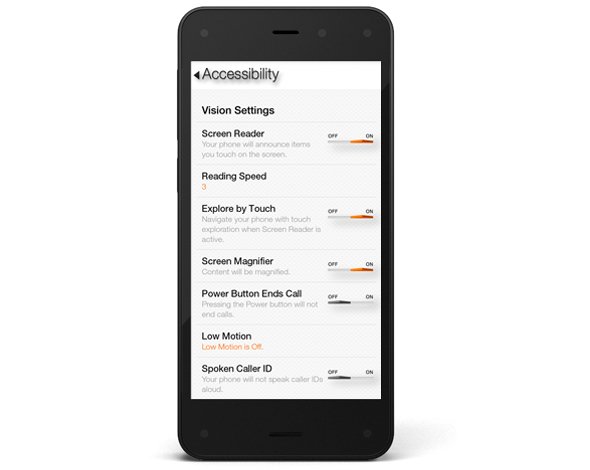
This week, Amazon announced there first smartphone called Fire Phone. The Fire Phone has a number of flashy, maybe even gimmicky, features along with a few features that may have serious accessibility implications. The phone which starts at $200 and starts shipping on July 25th runs Fire OS 3.5.0 similar to Amazon's Kindle Fire tablets. The operating system includes a number of built-in accessibility features including features to help blind, low vision, mobility impaired, and hearing impaired users. For blind and low vision users, the Fire Phone includes a screen reader which allows users to navigate the screen without seeing it. Assuming the Fire Phone uses the same text-to-speech voices as the Kindle Fire tablets, the text-to-speech voice used is very high quality. For low vision users, the Fire Phone includes a zoom mode and high contrast support. Closed captioning, mono audio, and hearing aid compatibility (HAC) are features included for users with hearing impairments.The Fire Phone also includes features for users with mobility challenges including dictation and improved one-handed usability. It is very encouraging to see Amazon include accessibility features in to their Fire Phone. Click here to read a full overview of all the Fire Phone's accessibility features. Amazon, once reluctant to support accessibility, has shown a new dedication to accessibility for users with disabilities. Hopefully, this continues in future updates to the Fire OS as well as to future products.

In addition to dedicated accessibility features, the Fire Phone has a couple of mainstream features that could be potentially beneficial to people with disabilities. The first of these features is called Mayday. Mayday is currently available on newer Kindle Fire tablets allows users to quickly connect and chat with technical support directly from their device. Simply by pressing the easy to access Mayday button users are atomically connected. Technical support staff can access certain device functions to assist users with a variety of questions. Support staff can even virtually draw on the screen to draw your attention to certain buttons. In my testing, I was able to connect with Mayday staff in under a minute and the staff was knowledgeable and friendly. The support personnel were even knowledgeable about accessibility features. This feature could be great for users with cognitive challenges who need assistance using certain features on their phone.

The second feature is called Firefly. By pressing a dedicated button on the side of the device and pointing the camera at an object the Fire Phone can identify that object. Amazon demonstrated this feature at their even and it worked very quickly. Firefly could be used by the blind to identify objects and differentiate objects of similar size and shape. For example, to identify if a can contains chicken soup or sliced peaches. Similar to iOS apps like TapTapSee, Firefly is Amazon's attempt to make buying merchandise through Amazon an easier process.

The Fire Phone seems promising, but it is impossible to determine its true value in terms of accessibility until it is released next month. Until then, click read more to view videos of the Fire Phone in action.


Thursday, 19 June 2014

Kindle App for iOS and Android Adds Whispersync for Voice


Amazon's Kindle app for iOS and Android was recently updated to integrate audio books from Audible. The update, which is available for free, allows users to seamlessly switch between reading the Kindle text version of a book to listening to the Audible audio version of a book. For example, if you read part of the book and then switch to the audio version the recording will pickup right where you left off. The new feature even allows users to listen to the audio book while following along with the text version. Audio speaking rate can be increased or decreased according to user preference. Unfortunately, unlike Immersion Reading on Kindle Fire tablets, the Kindle app for iOS and Android does not highlight the text as it is being read allowed. While this may not be an inconveniences for some users, it could be a major omission for users with tracking difficulty. For now, users will need a Kindle Fire tablet to take advantage of the full Immersion Reading experience. To learn more about Immersion Reading click here. There is one another major caveat: price. In order to take advantage of Whispersync for Voice or Immersion Reading on a Kindle Fire, you must purchases both the Kindle and Audible versions of a book. This can become extremely expensive for the occasional reader let alone a book worm.

To download the app for iOS click here and to download the app for Android click here. To view screenshots of the app in action click read more below.


Monday, 16 June 2014

How to Avoid Online Shopping Fraud?

Whether it is the latest tech gadget, new clothes, your next holiday trip, or car insurance - there are few things that you cannot buy online. But as great the pleasure of having everything delivered to your door step may be, the hard is the awakening once you realize you've become a victim of online shopping fraud.

During the past five years, every third online shopper has experienced fraud while shopping online according to a recent global consumer study. Beyond that, about USD 3.4 bn are lost each due to online shopping fraud - money from consumers like you and me!

Fortunately, there are a few simple rules that can help you to stay safe from becoming a victim of online shopping fraud and save a lot of money. The below infographic will show you how!


 How to Avoid Online Shopping Fraud

Courtesy of: TrustedCompany.com

How to Avoid Online Shopping Fraud?

Whether it is the latest tech gadget, new clothes, your next holiday trip, or car insurance - there are few things that you cannot buy online. But as great the pleasure of having everything delivered to your door step may be, the hard is the awakening once you realize you've become a victim of online shopping fraud.

During the past five years, every third online shopper has experienced fraud while shopping online according to a recent global consumer study. Beyond that, about USD 3.4 bn are lost each due to online shopping fraud - money from consumers like you and me!

Fortunately, there are a few simple rules that can help you to stay safe from becoming a victim of online shopping fraud and save a lot of money. The below infographic will show you how!


 How to Avoid Online Shopping Fraud

Courtesy of: TrustedCompany.com

Friday, 13 June 2014

Facebook's new style : Displaying Ads according to your browsing history !!!

Did you ever notice or thought that as we surf internet and the browsing history is saved in a cache in our PC, in the similar manner, what we access in Facebook, is also saved in the history. But now it will be saved in the browsing history of Facebook. 


The list of things or clicks that you do in the social media is now accessible by Facebook. But many people will think that it is a bit normal that as we surf internet, we do some searches in Facebook too. But remember, the social media giant uses your this browsing history to display ads on your screen. Whatever you search for will be displayed in the form of ads on your FB screen. 


It was stated in Sept 2013, that Facebook will display less ads. The News Feed displays the ads that are relevant to your likes and your browsing history. This is applicable for Facebook app users and PC users too. 


Can Online Games Really Work as a Learning Platform?

Can Online Games Really Work as a Learning Platform?
You might not realize this, but online games can actually do much more for your children than just provide them with a fun and time-consuming pastime. They can be used as a learning platform, as well.

Through the years, online games have actually become more and more popular with parents, teachers and kids alike. As a matter of fact, they are now considered to be a big part of today�s educational system, penetrating into classrooms and helping students learn various digital technologies while mastering different academic subjects and gaining more knowledge and skills in the process. Some of the subjects that these games can help greatly with include languages, math, painting, management, economics and physics.

As such, it is safe to say that online games really work as a learning platform � and an efficient one at that. After all, the right games can teach, control and evaluate students, as well as boost their overall motivation to learn more and study more. Aside from that, teachers and parents will also get to monitor the students� progress as time goes by and help them become more responsible in terms of their studies overall.

There are also various other benefits that come with using online games as a learning platform, though.

Playing online games is a pastime that will give children the chance to hone their skills while having fun at the same time. Parents and teachers will also have an easy time evaluating the knowledge and skills of the children through these games. While it wouldn�t be right to call these games proper assessment tools, especially if they aren�t labeled as actual educational games, they will still be able to evaluate the learning skills and progress of students with them in time.

Aside from that, online games are easy to access nowadays. Plus, students will be able to develop their creative skills when playing the right games. Playing online painting games, for example, can hone their creativity skills like no other.

Naturally, any top quality games can evoke a sense of learning responsibility in children and encourage them to learn new skills while developing their creativity. Online games do not just assess skills, after all; they can improve the learning process and turn it into a more interesting and efficient one, as well.

Online games can also be used to demonstrate and develop certain knowledge factors and skills, such as the use of computer skills, which is required by every online game out there; and the knowledge of math. There are actually quite a few quality math games on the Internet nowadays, where children will have to solve basic equations non-stop or within a certain limit of time.

There are also online games that can help hone creative skills and management skills, or even a mixture of both. If you are trying to use online games to teach younger children certain skills, then you might want to opt for games that feature their favorite cartoon characters. A lot of the time, children respond better when they see their favorite characters on the computer screen as they play.

There are also a lot of social media games that can help children multi-task and exercise their brain better. Believe it or not, even the most basic Facebook games out there can do wonders at exercising a child�s brain, no matter how futile they may seem.

Overall, it goes without saying that using online games for teaching and learning processes can definitely be very beneficial due to the convenience, accessibility and pleasure that come therewith. You just need ot make sure that your kids play the right ones.

Image Credit: Jeroen van Oostrom


Author Bio:
David Miller is an educational researcher who has vast experience in the field of teaching, Online testing and training. He is associated with prestigious universities and many leading educational research organizations. He�s also an ed-tech veteran, currently pursuing research in new eLearning developments and contributing author with ProProfs.

Can Online Games Really Work as a Learning Platform?

Can Online Games Really Work as a Learning Platform?
You might not realize this, but online games can actually do much more for your children than just provide them with a fun and time-consuming pastime. They can be used as a learning platform, as well.

Through the years, online games have actually become more and more popular with parents, teachers and kids alike. As a matter of fact, they are now considered to be a big part of today’s educational system, penetrating into classrooms and helping students learn various digital technologies while mastering different academic subjects and gaining more knowledge and skills in the process. Some of the subjects that these games can help greatly with include languages, math, painting, management, economics and physics.

As such, it is safe to say that online games really work as a learning platform – and an efficient one at that. After all, the right games can teach, control and evaluate students, as well as boost their overall motivation to learn more and study more. Aside from that, teachers and parents will also get to monitor the students’ progress as time goes by and help them become more responsible in terms of their studies overall.

There are also various other benefits that come with using online games as a learning platform, though.

Playing online games is a pastime that will give children the chance to hone their skills while having fun at the same time. Parents and teachers will also have an easy time evaluating the knowledge and skills of the children through these games. While it wouldn’t be right to call these games proper assessment tools, especially if they aren’t labeled as actual educational games, they will still be able to evaluate the learning skills and progress of students with them in time.

Aside from that, online games are easy to access nowadays. Plus, students will be able to develop their creative skills when playing the right games. Playing online painting games, for example, can hone their creativity skills like no other.

Naturally, any top quality games can evoke a sense of learning responsibility in children and encourage them to learn new skills while developing their creativity. Online games do not just assess skills, after all; they can improve the learning process and turn it into a more interesting and efficient one, as well.

Online games can also be used to demonstrate and develop certain knowledge factors and skills, such as the use of computer skills, which is required by every online game out there; and the knowledge of math. There are actually quite a few quality math games on the Internet nowadays, where children will have to solve basic equations non-stop or within a certain limit of time.

There are also online games that can help hone creative skills and management skills, or even a mixture of both. If you are trying to use online games to teach younger children certain skills, then you might want to opt for games that feature their favorite cartoon characters. A lot of the time, children respond better when they see their favorite characters on the computer screen as they play.

There are also a lot of social media games that can help children multi-task and exercise their brain better. Believe it or not, even the most basic Facebook games out there can do wonders at exercising a child’s brain, no matter how futile they may seem.

Overall, it goes without saying that using online games for teaching and learning processes can definitely be very beneficial due to the convenience, accessibility and pleasure that come therewith. You just need ot make sure that your kids play the right ones.

Image Credit: Jeroen van Oostrom


Author Bio:
David Miller is an educational researcher who has vast experience in the field of teaching, Online testing and training. He is associated with prestigious universities and many leading educational research organizations. He’s also an ed-tech veteran, currently pursuing research in new eLearning developments and contributing author with ProProfs.

Thursday, 12 June 2014

Replace Your Wedding Photographer With These Apps

Replace Your Wedding Photographer With These Apps

Imagine how great it would be if you could get out of spending one to four thousand dollars on a wedding photographer and still get the most wonderful pictures of your special day. This is all possible through a wedding photo app. If that is not enough to get you excited, then how about the fact that you can get such an app for just around $100? You will still have to pay to have the photos printed and framed, but you cut your wedding photography costs down an impressive amount. Here are some of the best photo apps that 2014 has to offer.

1. Wedsta

Remember when cameras were put out for the wedding guests to pick up and take pictures of the bride and groom, themselves and other people at the wedding? Well, this app really simplifies the whole process and is compatible with any iPhone or Android. You get the app and setup your account, then make sure that each of your guests has the app on their phone and is registered in your account. From here, a digital copy of any pictures your guests take while using the app will appear in your account, and you can access these pictures to share, print, edit, etc. for a year.

2. Capsule

This is a new one that's still free. Just like the other photo apps, Capsule allows anyone who you grant access to upload photos to your album. In addition, your guests can also choose the photos they want as keepsakes and print them on their own or order them.

Those whom the bride and groom grant access to their account can also like and comment on any photos in the album, whether they were present at the wedding or not. Popular social media accounts are also integrated so that the bride and groom can share their pics easily and quickly. If you have pictures on Instagram that you would like to include in your Capsule album, then you can do that as well through the use of the famous hashtag. There is no expiration date for this app, so you and others you invite can begin adding photos as early as you like.

3. Wedding Snap

This is another photo app that is compatible with both iPhones and Androids. Pricing starts at $99. With this app, your wedding moments are captured through the eyes of your family and dear friends rather than some photographer. Anyone you share this app with can take both pictures and videos of your wedding. There is no expiration date on your account so you can go to your Wedding Snap gallery and enjoy the special memories captured here forever. Since you can purchase this app as early as you want, you can capture those special moments from prewedding days as well.

4. Wed Pics

This wedding photo app seems to have some neat features and it's free. The bride and groom as well as an unlimited amount of guests can upload videos as well as photos. Uploads can then be organized into different albums. Those who were unable to attend the wedding can also be granted access to view the photos. You can do high quality downloads of any of the photos for printing and conventional framing or digital framing. There is no expiration on storage time, so you can download the app and make an account as soon as you want and include photos from events such as the proposal, the bachelor and bachelorette parties, etc.

ixigo Travel App for Windows


ixigo Travel App for Windows

Searching for flights on your Windows phone has never been more easier with the ixigo travel app that brings the features of the flight app, hotel app and the train app merged into a mega product that will solve all your travel needs. Here�s what all you can do:
  • Compare the prices and information from more than 100 travel sites for the best hotel and airline deals
  • Find the cheapest airfares and hotel deals across the world on a single platform
  • Read unlimited reviews from leading hotel review sites
  • Find train schedules, seat availability, PNR status and real time train running information
  • Browse through different train routes and choose the most convenient option
  • Explore berth/seat maps to select convenient seats
  • Rate and review trains.
The app has three sections: Flights, trains and hotels. Below are the features of these three sections in more detail.

Flight Search

Forget logging onto your computer every time you book your flight. The smart and intuitive flight app brings you the best and cheapest rates available across India�s leading travel agencies, such as jet airways and makemytrip, on a single platform. So you won�t need to check different websites for the cheapest airfares. The simple, fast and functional design offers you a seamless experience from searching your flights to booking it on the website of your choice from your Windows smartphone.

Train and PNR

This segment has all the features of the award-winning ixigo Indian rail and train app. Very useful for frequent train travellers, this app solves the problem of finding train availability, PNR status, train running status and more. You will receive notifications when your PNR status is updated or if your train has been delayed/cancelled. You can also compare routes of various trains and select the one that is most convenient. This segment allows you to rate and review various trains and go through other user reviews to help you make a more informed choice.

Hotels

This new section helps you find the best hotels in the places you are visiting according to your budget. Similar to the flight app, you can search and compare more than 250,000 hotels across the globe, from multiple travel sites, on a single platform. You can also rate and review hotels and read through the numerous user reviews collected from the best hotel review sites. This segment also contains an impressive list of budget hotels in all the major cities, complete with pictures, room rates and amenities available. The best part is, you can call these hotels and further negotiate on the prices mentioned.

This travel app for Windows smartphone is truly a timesaver when it comes to travelling. The attractive and fast interface also comes without annoying advertisements. The compact size of 3.8 MB is an added boon. All in all, the ixigo travel app for Windows smartphone is an amazing one app solution for all your travel bookings. We give two thumbs up for this app. Get it at the Windows App Store now!


Author Bio:
This post is submitted by Chandralekha. This time she has written information about ixigo travel app for windows. In order to make your trip hassle free use best rail app and PNR app etc. Hope the information shared about the travel app may help to plan your trip.

ixigo Travel App for Windows


ixigo Travel App for Windows

Searching for flights on your Windows phone has never been more easier with the ixigo travel app that brings the features of the flight app, hotel app and the train app merged into a mega product that will solve all your travel needs. Here’s what all you can do:
  • Compare the prices and information from more than 100 travel sites for the best hotel and airline deals
  • Find the cheapest airfares and hotel deals across the world on a single platform
  • Read unlimited reviews from leading hotel review sites
  • Find train schedules, seat availability, PNR status and real time train running information
  • Browse through different train routes and choose the most convenient option
  • Explore berth/seat maps to select convenient seats
  • Rate and review trains.
The app has three sections: Flights, trains and hotels. Below are the features of these three sections in more detail.

Flight Search

Forget logging onto your computer every time you book your flight. The smart and intuitive flight app brings you the best and cheapest rates available across India’s leading travel agencies, such as jet airways and makemytrip, on a single platform. So you won’t need to check different websites for the cheapest airfares. The simple, fast and functional design offers you a seamless experience from searching your flights to booking it on the website of your choice from your Windows smartphone.

Train and PNR

This segment has all the features of the award-winning ixigo Indian rail and train app. Very useful for frequent train travellers, this app solves the problem of finding train availability, PNR status, train running status and more. You will receive notifications when your PNR status is updated or if your train has been delayed/cancelled. You can also compare routes of various trains and select the one that is most convenient. This segment allows you to rate and review various trains and go through other user reviews to help you make a more informed choice.

Hotels

This new section helps you find the best hotels in the places you are visiting according to your budget. Similar to the flight app, you can search and compare more than 250,000 hotels across the globe, from multiple travel sites, on a single platform. You can also rate and review hotels and read through the numerous user reviews collected from the best hotel review sites. This segment also contains an impressive list of budget hotels in all the major cities, complete with pictures, room rates and amenities available. The best part is, you can call these hotels and further negotiate on the prices mentioned.

This travel app for Windows smartphone is truly a timesaver when it comes to travelling. The attractive and fast interface also comes without annoying advertisements. The compact size of 3.8 MB is an added boon. All in all, the ixigo travel app for Windows smartphone is an amazing one app solution for all your travel bookings. We give two thumbs up for this app. Get it at the Windows App Store now!


Author Bio:
This post is submitted by Chandralekha. This time she has written information about ixigo travel app for windows. In order to make your trip hassle free use best rail app and PNR app etc. Hope the information shared about the travel app may help to plan your trip.

Wednesday, 11 June 2014

Online Flashcards: An Effective Learning Tool

Online Flashcards
An entire study session can become useless if the information being read is not readily absorbed. Not much learning happens in a boring study session. It needs to be more engaging and interesting for a student to easily grab the concepts being taught. Flashcards are a perfect tool for this purpose. It becomes easier for a student to process information if it is provided in a highly interactive, fun and engaging manner. Unlike other study resources, the effects of using this learning tool are visible straight away. Let�s look at online flashcards in a more detailed way.

How are Online Flashcards Different from their Traditional Counterparts?

The purpose of online flashcards is the same as traditional ones. Students use the course material and other relevant information in order to create their own summarized engaging flashcards, which are then used to revise what have been learned so far.

So, what is the difference then? The difference comes with the use of modern technology. Online flashcards not only help students fulfill their study goals, but provide a much more engaging and interactive effective learning tool. They are not another electronic, flashier version of the traditional means of learning, but are in fact a handy addition to the learning system.

Why Use Online Flashcards

With the availability of free online study tools, making flashcards is not a difficult task. Flashcards can be easily created and stored online. You no longer have to spend hours and hours making flashcards. With online software applications you can create colorful, attractive and engaging flashcards in a matter of minutes. You can even add pictures and small animations.

You no longer have to carry the flashcards physically. Since, most services are cloud based, flashcards created can be accessed from anywhere. You will also not have to worry about forgetting your flashcards at home. They will be with you all the time. You just have to use a compatible device to access them over the internet.

Besides all this, creating online flashcards does not cost you any money. Different sites allow users to create online flashcards free of cost. Similarly, these online flashcards are stored in the form of libraries. You can easily arrange them according to subject matter and the sequence you desire to study them in. Unlike traditional flashcards, online flashcards can be shared among several people at the same time.

Online flashcards can be used in different ways. You can not only revise and learn from them but put them to other uses as well. For example, you can randomize the flashcards you have created and create a quiz for yourself. The quiz will be based on the information you have added to your online flashcards, giving you the chance to test your knowledge in a stress-free environment.

Online Flashcards and Teachers

Students are not the only ones who can use online flashcards. Teachers can make use of online flashcards to enhance the effectiveness of their classes. Students can be asked to prepare online flashcards as their assignments. Similarly, teachers can also use online flashcards to create quizzes and test their students� knowledge and skills. Good thing about this is that students will not feel stressed or pressured. Rather, they will see an online quiz as some form of puzzle or game. Besides this, teachers can simply review the flashcards created by each student from time to time to check on their progress.

Online flashcards are an effective learning tool that not only gives students an interactive and engaging means to study, but facilitates teachers and helps them improve the effectiveness of their teaching sessions as well.


Author Bio:
David Miller is an educational researcher who has vast experience in the field of teaching, Online testing and training. He is associated with prestigious universities and many leading educational research organizations. He�s also an ed-tech veteran, currently pursuing research in new eLearning developments and contributing author with ProProfs.

Online Flashcards: An Effective Learning Tool

Online Flashcards
An entire study session can become useless if the information being read is not readily absorbed. Not much learning happens in a boring study session. It needs to be more engaging and interesting for a student to easily grab the concepts being taught. Flashcards are a perfect tool for this purpose. It becomes easier for a student to process information if it is provided in a highly interactive, fun and engaging manner. Unlike other study resources, the effects of using this learning tool are visible straight away. Let’s look at online flashcards in a more detailed way.

How are Online Flashcards Different from their Traditional Counterparts?

The purpose of online flashcards is the same as traditional ones. Students use the course material and other relevant information in order to create their own summarized engaging flashcards, which are then used to revise what have been learned so far.

So, what is the difference then? The difference comes with the use of modern technology. Online flashcards not only help students fulfill their study goals, but provide a much more engaging and interactive effective learning tool. They are not another electronic, flashier version of the traditional means of learning, but are in fact a handy addition to the learning system.

Why Use Online Flashcards

With the availability of free online study tools, making flashcards is not a difficult task. Flashcards can be easily created and stored online. You no longer have to spend hours and hours making flashcards. With online software applications you can create colorful, attractive and engaging flashcards in a matter of minutes. You can even add pictures and small animations.

You no longer have to carry the flashcards physically. Since, most services are cloud based, flashcards created can be accessed from anywhere. You will also not have to worry about forgetting your flashcards at home. They will be with you all the time. You just have to use a compatible device to access them over the internet.

Besides all this, creating online flashcards does not cost you any money. Different sites allow users to create online flashcards free of cost. Similarly, these online flashcards are stored in the form of libraries. You can easily arrange them according to subject matter and the sequence you desire to study them in. Unlike traditional flashcards, online flashcards can be shared among several people at the same time.

Online flashcards can be used in different ways. You can not only revise and learn from them but put them to other uses as well. For example, you can randomize the flashcards you have created and create a quiz for yourself. The quiz will be based on the information you have added to your online flashcards, giving you the chance to test your knowledge in a stress-free environment.

Online Flashcards and Teachers

Students are not the only ones who can use online flashcards. Teachers can make use of online flashcards to enhance the effectiveness of their classes. Students can be asked to prepare online flashcards as their assignments. Similarly, teachers can also use online flashcards to create quizzes and test their students’ knowledge and skills. Good thing about this is that students will not feel stressed or pressured. Rather, they will see an online quiz as some form of puzzle or game. Besides this, teachers can simply review the flashcards created by each student from time to time to check on their progress.

Online flashcards are an effective learning tool that not only gives students an interactive and engaging means to study, but facilitates teachers and helps them improve the effectiveness of their teaching sessions as well.


Author Bio:
David Miller is an educational researcher who has vast experience in the field of teaching, Online testing and training. He is associated with prestigious universities and many leading educational research organizations. He’s also an ed-tech veteran, currently pursuing research in new eLearning developments and contributing author with ProProfs.

Monday, 2 June 2014

iOS 8 Accessibility Roundup: More Accessible Than Ever

Credit: Apple
Credit: AppleToday, Apple previewed iOS 8, the next operating system for iPhone, iPad, and iPod touch. iOS 8 builds on existing accessibility features to offer some exciting new possibilities for iOS users with disabilities. Many websites will have general information about iOS 8, but this post will focus on accessibility related changes to iOS. iOS 8 includes new keyboard options, improved text-to-speech voices, improved Guided Access features, and improved Siri functionality among other accessibility related features. Apple can always add or alter features before the general release. The new operating system will be available this fall for the general public.

QuickType and Keyboard

Apple's iOS 8 will include a built in predictive keyboard called QuickType. This new software keyboard will predict words for the user as they type. Once the word you want to enter appears in the suggestion bar above the keyboard, you simply tap it to insert that word. This feature will cut down on key strokes needed to enter words which will benefit people with dexterity challenges. QuickType even takes context into account so if your typing an email it will suggest more formal language that if you are writing a text message. QuickType will be similar to the Co:Writer app, but will work across all apps on your devices.

In addition to Apple's own QuickType keyboard, iOS 8 will allow third-party developers to develop keyboards for system wide use. For example, Fleksy could be updated to work with every app on the iPhone or iPad. This flexibility gives users with different abilities the opportunity to switch keyboards to one that fits their needs. For users who are blind or visually impaired downloading the fast and accessible Fleksy keyboard may allow them to more easily enter text.

Health

iOS 8 takes big steps to help people manage data associated with their health. Users can input data into the health app through third-party health monitoring devices like a blood pressure reader or through apps. This data can then be automatically shared with doctors and other health care professionals to help insure timely and appropriate care. For instance, if a blood pressure or glucose reading was outside of a normal range, a doctor could be automatically alerted. This could help people with chronic conditions live more independently especially in their later years.

The health app will include another life saving feature called "in case of emergency card." This information card will be accessible from the lock screen and will allow first responders and emergency room doctors important health information in the case of an emergency. The card can include a photo, medical conditions, allergies, current medications, and more all to give life saving information to emergency medical personnel.

Credit: Apple

Family Sharing

Family sharing will allow families with multiple iOS 8 devices to manage their iOS devices more harmoniously. Parents will be able to set up home sharing to monitor their child's physical location or to share purchased content from the iTunes store among members of the family. Children will also have to ask parents permission before purchasing an app.

Spotlight Search

Spotlight search is an existing feature in iOS 7, but in iOS 8 it gets supercharged. Spotlight in iOS 8 will give Siri-like answers. Unlike Siri, which uses voice input, spotlight uses text input. This new form of input gives users with speech impairments the ability to type, instead of speak, queries and get meaningful results.

Touch ID

iOS 8 improves Touch ID by allowing third-party apps to unlock information using just a user's fingerprint. Touch ID is currently used for unlocking your device and making iTunes purchases. This feature already is great for blind users because it offers secure authentication without having to type, which can be a slower process with VoiceOver. In iOS 8, the ability to access third-party apps with just a finger print will expand on the already very accessible Touch ID feature of iOS 7.

Siri
iOS 8 will also bring improvements to Siri. Most notably, users will be able to activate Siri hands-free by saying "Hey, Siri." This new hands-free voice command may benefit people that have trouble activating the home button. This always listening feature is similar to Google's advanced voice search.

iOS 8 will also offer faster dictation that appears on screen as you speak. This new feature will prusumably work with Siri and in app dictation.

Much More
Credit: Apple

iOS 8 will also include features that Apple did not have time to fully preview during their keynote. The first one included in the keynote was "Braille Keyboard for direct 6-dot Braille input." Other accessibility related features include the ability to use the advanced and high quality Alex voice. The Alex voice is currently available for the Mac and many users enjoy its high quality. iOS 8 will also include improved zoom for accessibility, but no further details on this feature where offered.

iOS 8 will also include some enhancements to Guided Access. Guided Access is a feature that locks a user into a single app. This is great for teachers administering tests on an iPad or parents of kids who are easily distracted. In iOS 8, users will be able to use Touch ID to exit from Guided Access. Users will also be able to use time limits and countdown timers to control Guided Access.

Another feature listed is "Speak screen," a somewhat mysterious feature than did not garner any further explanation from Apple. Speak screen may be a brand new accessibility feature or maybe unrelated to accessibility, but the name seems to imply some link to accessibility.